See beyond the bill.
Circuit-level information helps you understand which parts of the house are using electricity. Bring context to the numbers you see each month.
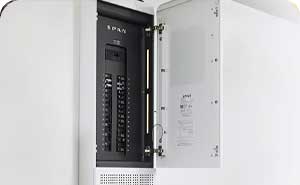
A smart panel puts your home’s energy in view. Explore circuit-level monitoring, control and a more intentional way to use battery backup with SPAN.
Try a simplified home. Switch example circuits, choose outage priorities, and see how the total demand changes.
Turn example circuits on or off. Set their outage priorities, then switch to the outage example.
This example uses 4.65 kW across five circuits. Prioritizing the refrigerator, lights and home office reduces example demand to 0.45 kW. Enable JavaScript to explore different choices.
5 of 6 circuits powered
Lit connections follow your selections. This diagram does not control real equipment.
Smaller loads can leave more stored energy for the things you want to keep running.
The right panel plan begins with how you use your home today—and what you want to add tomorrow.
Talk through your electrical planCircuit-level information helps you understand which parts of the house are using electricity. Bring context to the numbers you see each month.
With a compatible battery system, SPAN supports circuit priorities during an outage. Equipment compatibility and the circuits you need are part of the design conversation.
Explore battery backup ↗An EV charger, heat pump or other electric appliance changes the picture. We assess service capacity, circuit space and load-management options together.
Plan home charging ↗A panel is part of a larger electrical system. We start with the whole home and explain the scope before installation.
Review your existing panel, service, major loads, internet connection and future projects.
Confirm the proposed SPAN model, installation scope and compatibility with any solar or battery equipment.
Coordinate the required approvals and installation, then walk through the app, circuits and your agreed backup priorities.
Considering a connected panel? These are good places to start.
Explore all FAQs ↗No. A smart panel manages electricity; a battery or other appropriately designed backup system supplies stored or generated power. The panel, backup equipment and selected circuits need to work together.
SPAN Panel is designed as an electrical panel replacement. The right model and installation depend on your service, circuit count, panel location and other equipment. A site assessment establishes the scope.
Compatibility depends on the SPAN model, battery, inverter and backup-control equipment. We confirm the current manufacturer requirements for your specific combination before recommending a design.
SPAN’s monitoring and remote-control features require connectivity. Your installation plan should include a reliable network connection and a conversation about behavior when connectivity is unavailable.
Load management may help some homes add electric equipment within their existing service capacity. It is not a universal substitute for an upgrade. A load assessment and the proposed equipment determine the options.
Product background: SPAN Panel overview (opens in a new tab).
Tell us about your panel, your home and what you want to connect. We’ll help you understand where SPAN could fit.
Explore a smarter panel